How to Pass a Local Admin Account as Credentials for ADE
In certain environments, a network may include machines that are both part of a domain (e.g., Domain A) and outside of it. For instance, if an organization has computers connected to a network where some are within Domain A and others are not, ADE can utilize domain credentials to scan the machines within the domain. However, those same credentials cannot be used to scan machines outside the domain, even though they are still connected to the network.
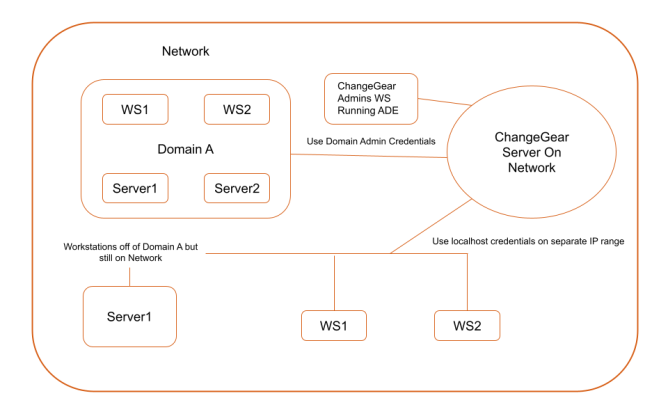
While domain credentials can be used to scan machines within the domain, they cannot authenticate non-domain machines. This guide explains how to configure the ADE to scan non-domain machines using a local admin account.
Before You Begin
-
Local Admin Account - ensure that a local administrator account (e.g., localhost\localadmin) exists on each non-domain machine.
-
Uniform Credentials - use the same username and password for the local admin account across all non-domain machines.
-
IP Range Identification - identify the IP range of the non-domain machines on the network.
To configure ADE to use local admin credentials:
-
Open the ADE Tool from the ChangeGear/ADE Server or from your admin workstation.
-
Create a new discovery profile for non-domain machines.
-
In the IP Range field, define the IP range that includes only non-domain machines.
Here's an example:
- Domain A Machines
- IP Range: 192.168.1.0/24
- Credentials: DomainA\admin
- Non-Domain Machines
- IP Range: 192.168.2.0/24
- Credentials: localhost\localadmin
Tip: Ensure this IP range does not overlap with the IP range for Domain A machines unless the local admin account is valid on Domain A machines as well.
-
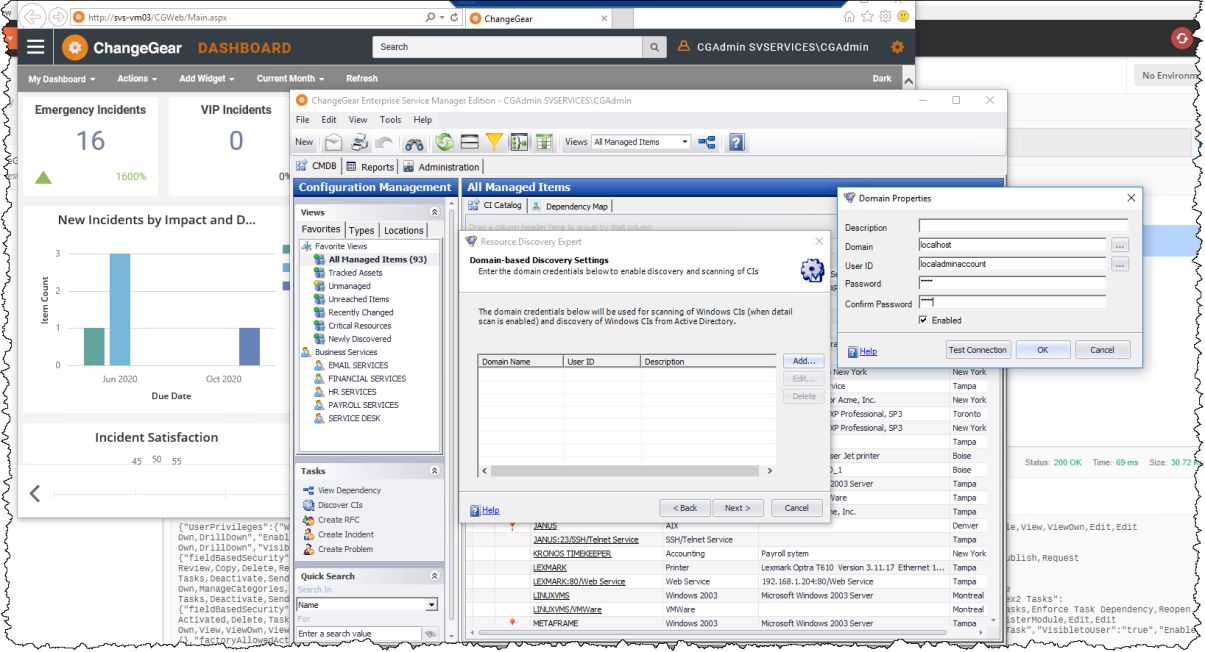
In the Domain field, enter localhost as the domain name. DO NOT USE ".\" as it will default to the host machine running ADE.
-
Enter the username (e.g., localadmin) and password for the local admin account in the User ID and Password fields.
-
Use the Test Connection button to verify that ADE can authenticate with the provided credentials on a sample machine from the IP range.
-
Save the profile and start the scan. ADE will dynamically use the localhost\localadmin credentials to access each machine in the specified IP range.