Managing Data Group Properties
Properties define the specific data points collected within a data group, such as an asset’s MAC address or firmware version. Properties are independent of data group creation and can be managed on their own.
To add a property:
-
Select a data group within a data model.
-
Click Add Property (+).
-
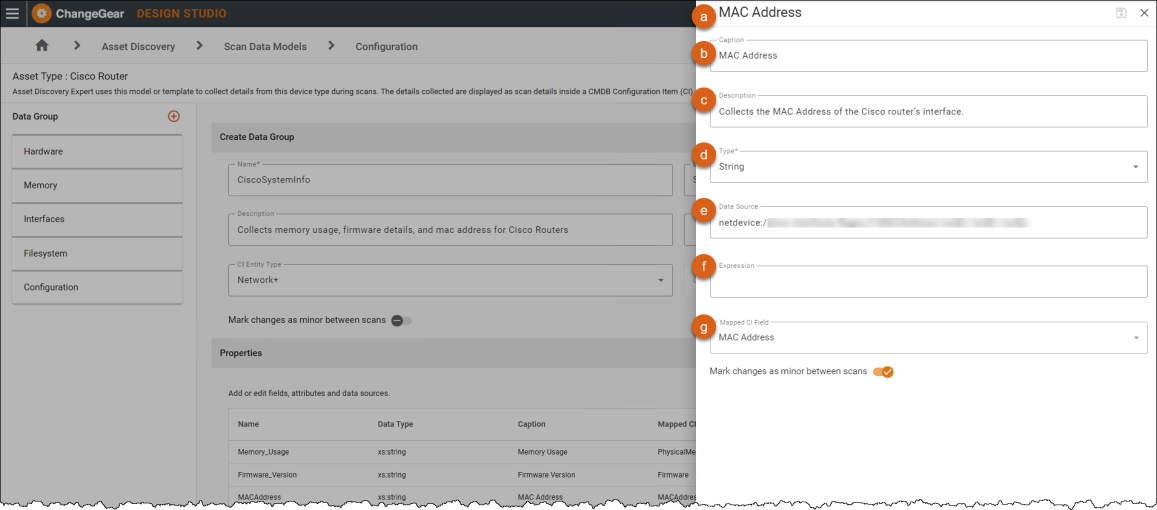
Fill out the form.
-
Name- The internal name of the property.
-
Caption - The display label.
-
Description - Provide any additional context.
-
Type - Choose a data type (e.g., string, integer).
-
Data Source - Define the protocol, OID, or method for retrieval.
-
SNMP OID -
1.3.6.1.2.1.1.5(used to retrieve the system's hostname). -
WMI Query -
SELECT Name FROM Win32_NetworkAdapter(used to fetch adapter names from Windows systems).
-
-
Expression (Optional) - Use to derive or transform the property value based on a formula or calculation (e.g., advanced user or developer applying custom logic).
-
Example -
Expression="TotalVirtualMemorySize/(1024)"converts the virtual memory size from bytes to kilobytes for display or further use. -
String Value Example -
msdata:Expression="TRIM(ServicePackMajorVersion+'.'+ServicePackMinorVersion)"generates a string value combining the major and minor versions, such as 8.1.
-
-
Mapped CI Field (Optional) - Link to a CMDB field.
-
-
Click Save.
To edit a property:
-
In the Properties grid, double-click an existing property to edit.
-
Update fields as needed.
-
Click Save.
See also: