Scan Data Models
Data models define how data is structured and collected from various devices such as printers and servers during Asset Discovery. They specify both the source of data (e.g., WMI, SNMP, SSH) and the structure of the collected information.
In ChangeGear, a resource type (also known as asset type) has an associated data model that defines the data collected during Asset Discovery. This data model includes data groups and properties specific to the resource type, such as printers or servers, and determines how the collected information is organized and presented in Configuration Management (CMDB).
Example: Printer Data Model
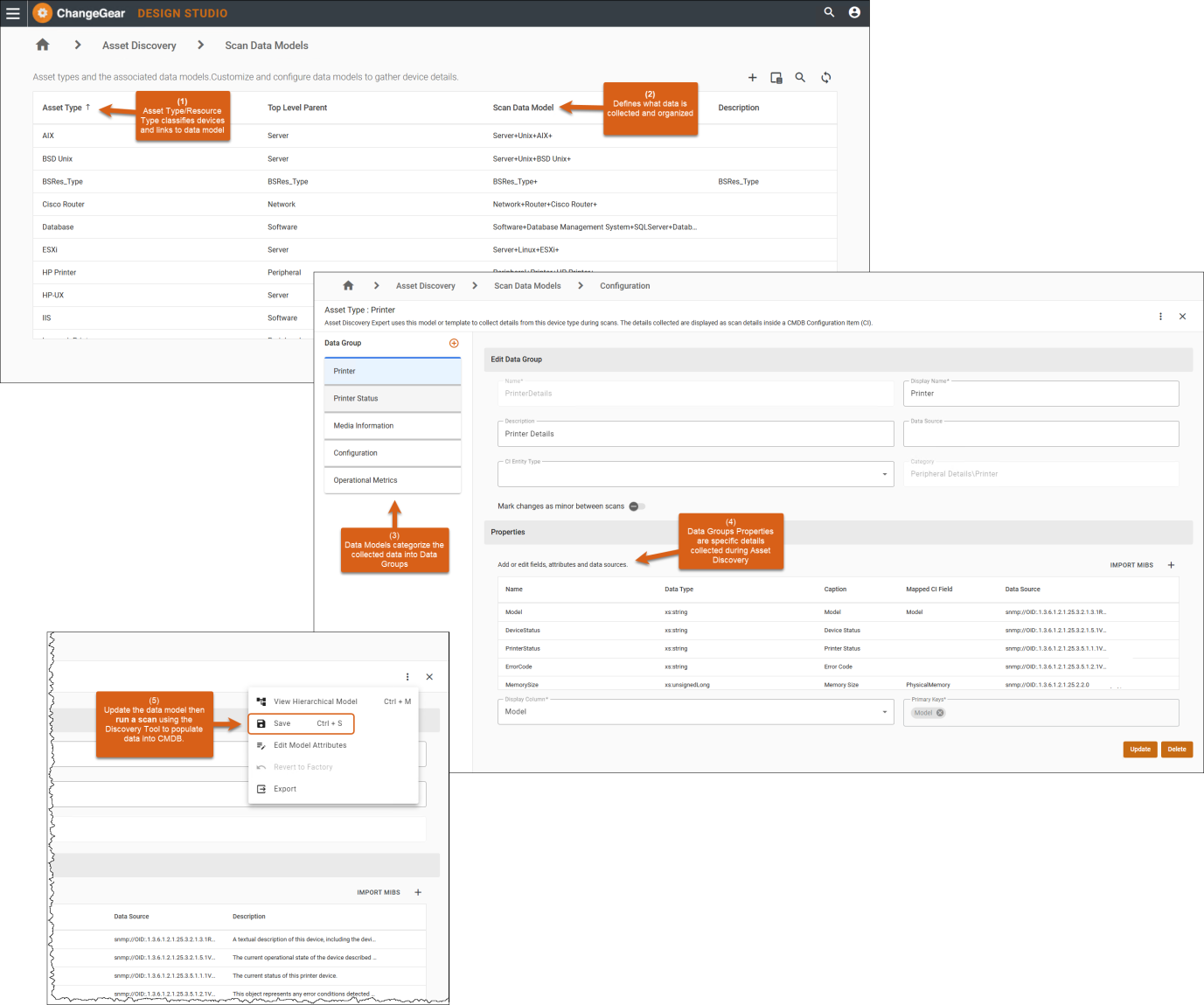
Note: The structure of the scan data model determines how the discovered details are presented in the Configuration Item (CI) form in CMDB.
Customizing Data Models
Add unique attributes or fields specific to the network devices in your organization by customizing the factory data models or create your own data model for a device type in your network.
Starting with the Great Barrier Reef release (2025), you can customize data models using the Data Model Editor in Design Studio. This web interface lets you tailor data models to fit your environment, ensuring they are relevant and persist across upgrades.
For example, if a device data model does not include firmware version, you can add the data source to collect the data.
Note: Factory scan data models are updated to collect comprehensive device details, providing robust functionality out-of-the-box while allowing customization, if needed.
Explore these topics to learn more about customizing data models: