Discovery Settings
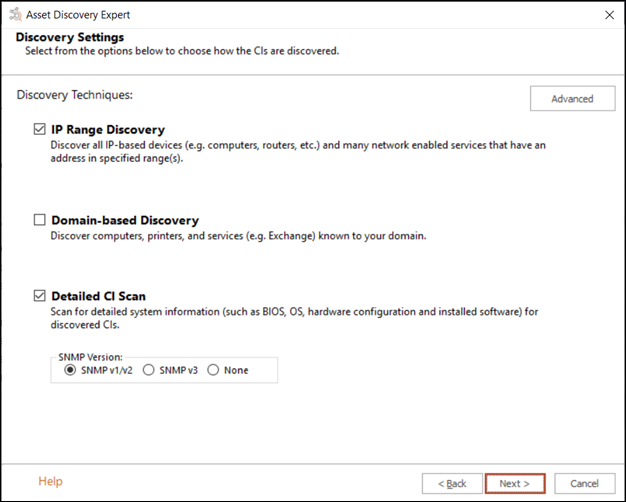
If you choose IP Range Discovery, the ADE will scan within the specified IP range for devices attached to the network, including services and relationships between the services and CIs. Certain network devices, such as SNMP-enabled devices, can only be discovered using this technique. This selection discovers less information from Windows computers, but will find network devices that the Domain-based Discovery misses. After the IP-based discovery is complete, the ADE will contact AD to classify the resources that were discovered during IP-based discovery.
If you choose only Domain-based Discovery, you can discover CIs, including services and the relationships between the services and CIs, within your domain and subdomains. You can optionally filter the domain by IP range so that CIs that are within the specified IP range and also within the domain are discovered. Resources without DNS entries will not be discovered, such as routers and switches. This selection will find your Windows-based devices and the relationships between the device and its service.
You can discover new CIs using the ADE by running a full network scan using both the Domain-based Discovery and IP Range Discovery options. In the given domain and IP range, the ADE will find the devices that are connected to your network domain, discover services on the devices, the relationships between services and devices, and identify your Windows-based and SNMP-enabled network devices.
By selecting the Detailed Resource Scan, the ADE will gather machine information (such as BIOS, OS, hardware configuration) for resources discovered during scanning. Scanning can take place independently of the other selections or in conjunction with the selections. This information is viewable on the Configuration tab of the CI in the CMDB. If you wish to detect SNMP devices, select the version that you wish to use in your scan. Alternatively, select None to avoid using SNMP.
See also: