Advanced Discovery Settings
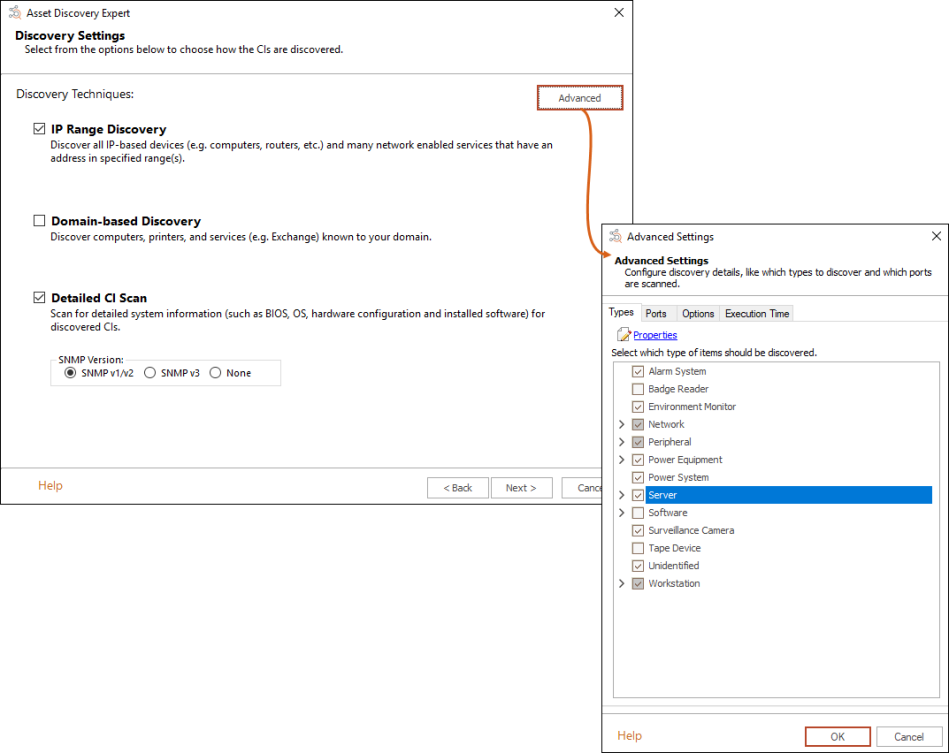
The Advanced Settings dialog lets you extend the ADE by adding, removing, or modifying what is discovered by the ADE. For example, you can:
-
Enable workstation discovery
-
Prevent specific resource types from being discovered
-
Discover and classify more network-based software
-
Change which resource type is associated with which port
-
Set a time limit for performing detail scans
To access the Advanced Settings dialog, click the Advanced... button from the ADE Discovery Settings dialog.
Note: While the ADE is easy to customize to find new software resource types, discovering new hardware resource types or gathering configuration details about either new hardware or software resource types must be handled with the assistance of the Serviceaide Support Team. Contact the Support Team at support@serviceaide.com or at (813) 632-3600 for more information about this documented process.
The Type tab manages which resource types are discovered, while the Port tab manages which ports are scanned and what resource types are mapped to each port. The Options tab manages what discovery and scanning methods are used when ADE is run, and the Execution Time tab sets the maximum amount of time the ADE will spend scanning a single device.
This section includes the following topics for Advanced Discovery Settings: